 DeepCurrent

More people now ask an assistant the question they used to type into Google: “who's a good florist near me?” or “which roofer in town do people trust?” You can find out whether your business is named in those answers in about twenty minutes, without buying anything. Here is how to do it properly, and how to read what comes back.
Why this is worth twenty minutes
When someone searches Google, they get a page of ten results and a map with three businesses on it. When they ask ChatGPT or Gemini, they usually get a short list — often three to five names — and a reason for each. If you are not on that short list, there is no page two to scroll to.
Both ChatGPT and Gemini can now look things up on the web before they answer, so what they say is shaped by what is written about your business online: your website, your Google Business Profile, directories, review sites and local news. Google says plainly that there is no special trick to being included in its own AI answers: “There are no additional requirements to appear in AI Overviews or AI Mode, nor other special optimizations necessary.”1 The same groundwork that helps you in ordinary search is what these answers are built from.
Step 1: Write down the questions your customers actually ask
Don't start with your business name. Nobody who already knows your name needs an assistant to recommend you. Start with the question a stranger would ask. Write five to ten of them, in the words a customer would use:
- “Who does wedding flowers in [your town]?”
- “Best emergency plumber near [your neighbourhood]”
- “I need a florist who delivers same day in [town] — who should I call?”
- “Which [trade] in [town] has the best reviews?”
Mix short searches with full sentences. Include at least one question about a specific service you want more of (“sympathy flowers”, “metal roof installation”), because that is where a small business can be named ahead of a bigger one.
Step 2: Ask cold
This is the step most people get wrong. If you ask from your own account, the assistant may remember earlier chats where you mentioned your business, and it will happily name you back. That tells you nothing.
- Use a private or incognito browser window, signed out where the assistant allows it, or a fresh account that has never mentioned you.
- Turn off memory or custom instructions if you are signed in.
- Never mention your business name, your website or a competitor in the question.
- Ask each question in a new chat, so one answer doesn't steer the next.
Ask every question in both ChatGPT and Gemini. They don't always agree, and a customer could be using either.
Step 3: Record what comes back
A simple spreadsheet is enough. For each question and each assistant, write down:
- Were you named? Yes or no.
- Where in the list? First, third, last.
- Who else was named? These are the businesses the assistant thinks of as your competition, which isn't always who you would guess.
- What reason was given? “Known for same-day delivery”, “highly rated on Google”. This tells you what the assistant believes about each business.
- What sources were linked? When the assistant searched the web it usually shows links. Note which sites they are: your own site, Yelp, a “best of” list, a local newspaper.
Then do it again in a few weeks. One check is a snapshot. Answers move from day to day, and the same question can get a slightly different list an hour later. What matters is the pattern over several checks: are you named most weeks, some weeks, or never?
Step 4: Read the answers for clues
The sources the assistant cites are the most useful part of the whole exercise. They show you where it got its picture of your town.
If directories and “best of” lists keep coming up
Assistants lean heavily on pages that compare several businesses at once. If the same three directories or a local “best florists in town” article keep appearing, check whether you are on them and whether your details there are right. Being missing from the pages the assistant reads is the most common reason a good business isn't named.
If the reason given for a competitor is something you also do
If a competitor is named for “same-day delivery” and you also deliver same day, but your website only says so in a footnote, that's a fixable gap. Say it plainly, on its own page, in words a customer would search for.
If your details are wrong
Sometimes the assistant names you with an old address, a closed location or a service you stopped offering. That usually comes from an outdated listing somewhere. Find it and correct it at the source — you can't edit the assistant's answer directly.
Step 5: Fix the groundwork, not the assistant
There is a growing industry selling ways to “get into ChatGPT”. Be careful with it. Nobody controls these answers, and the honest work is the same work that helps you on Google:
- Your Google Business Profile complete and correct — categories, services, hours, photos. Google says local results depend mainly on how relevant a business is, how far it is from the person searching and how well-known it is, and that “more reviews and positive ratings can help your business's local ranking.”2
- A page on your website for each service, saying what you do, where you do it and who it's for, in plain text rather than inside images.
- Reviews that mention what you did, which happens naturally when you ask every customer, without being pushy.
- Being on the comparison pages the assistants cite for your town and trade.
Expect this to be slow. Being named by an assistant is earned the same way a search ranking is, over months, not with a single edit.
Doing it every week without the spreadsheet
The manual method works, and you should try it once so you know what the answers look like. Keeping it up is the hard part: ten questions, two assistants, every week, asked cold, recorded the same way each time.
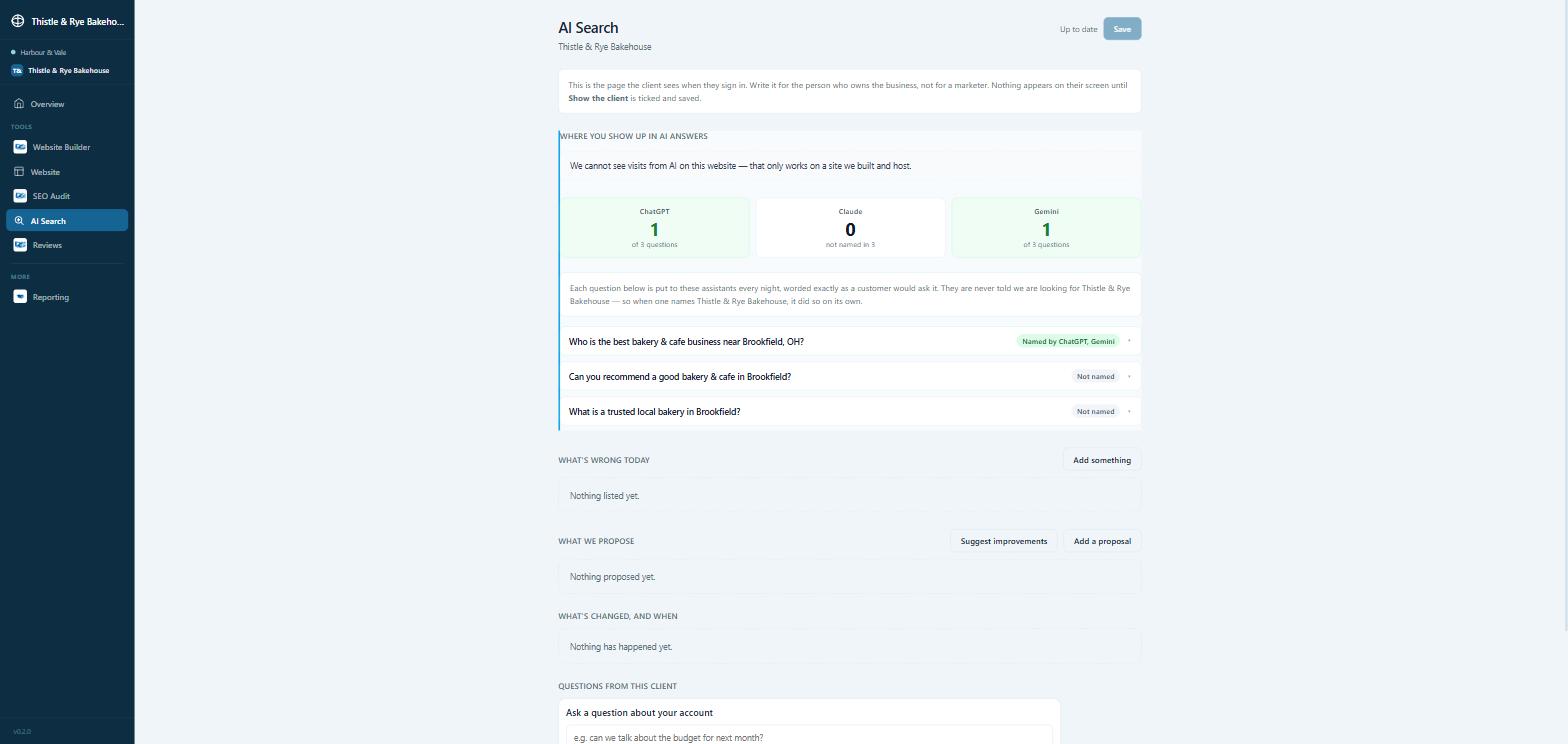
That is what the AI Search check in Deep Current's SEO tools does. Every week it puts a customer's real question to ChatGPT and Gemini without any hint which business we are hoping to hear about, and records whether the business was named, who was named instead and what was said. It sits on the same screen as your Google rankings and the local map, so you can see whether a change you made shows up in both. It is included in the Plus plan, which is $149 a month for a business, or $125 per client on the agency Plus bundle (see pricing).
It won't promise you a mention. Nothing honest can. What it will do is tell you, every week, exactly where you stand.
If you are comparing all-in-one platforms for this kind of work, our GoHighLevel comparison sets out what each one does and doesn't do.
Sources
- Google Search Central, “AI features and your website”: developers.google.com/search/docs/appearance/ai-features
- Google Business Profile Help, “Tips to improve your local ranking on Google”: support.google.com/business/answer/7091